Sign in with Aptos
AIP-116 - Sign in with Aptos
Section titled “AIP-116 - Sign in with Aptos”Summary
Section titled “Summary”The “Sign in with Aptos” (SIWA) standard introduces a secure and user-friendly way for users to authenticate to off-chain resources by proving ownership of their Aptos accounts. It simplifies the authentication process by replacing the traditional connect + signMessage flow in the wallet standard with a streamlined one-click signIn method. SIWA leverages Aptos accounts to avoid reliance on traditional schemes like SSO while incorporating security measures to combat phishing attacks and improve user visibility.
Out of scope
Section titled “Out of scope”This standard assumes familiarity with how transaction signatures are verified on Aptos (Developer Documentation) and with digital signatures in general, as a cryptographic primitive.
Motivation
Section titled “Motivation”Why is this important?
Section titled “Why is this important?”Today, signing in to non-blockchain services typically involves the use of identity providers (IdPs) which are centralized entities with ultimate control over a user’s identity. Examples being large internet companies (Google or Apple) and email providers. This centralization poses a risk, as IdPs can be single points of failure, vulnerable to breaches, censorship, or account lockouts. SIWA introduces a new non-custodial solution for users to assume control and responsibility of their own digital identity.
Many existing applications in Aptos ecosystem today support a form of authentication via Aptos accounts through the connect + signMessage flow. However, while this approach exists, the existing connect + signMessage presents a few issues:
The connect + signMessage flow…
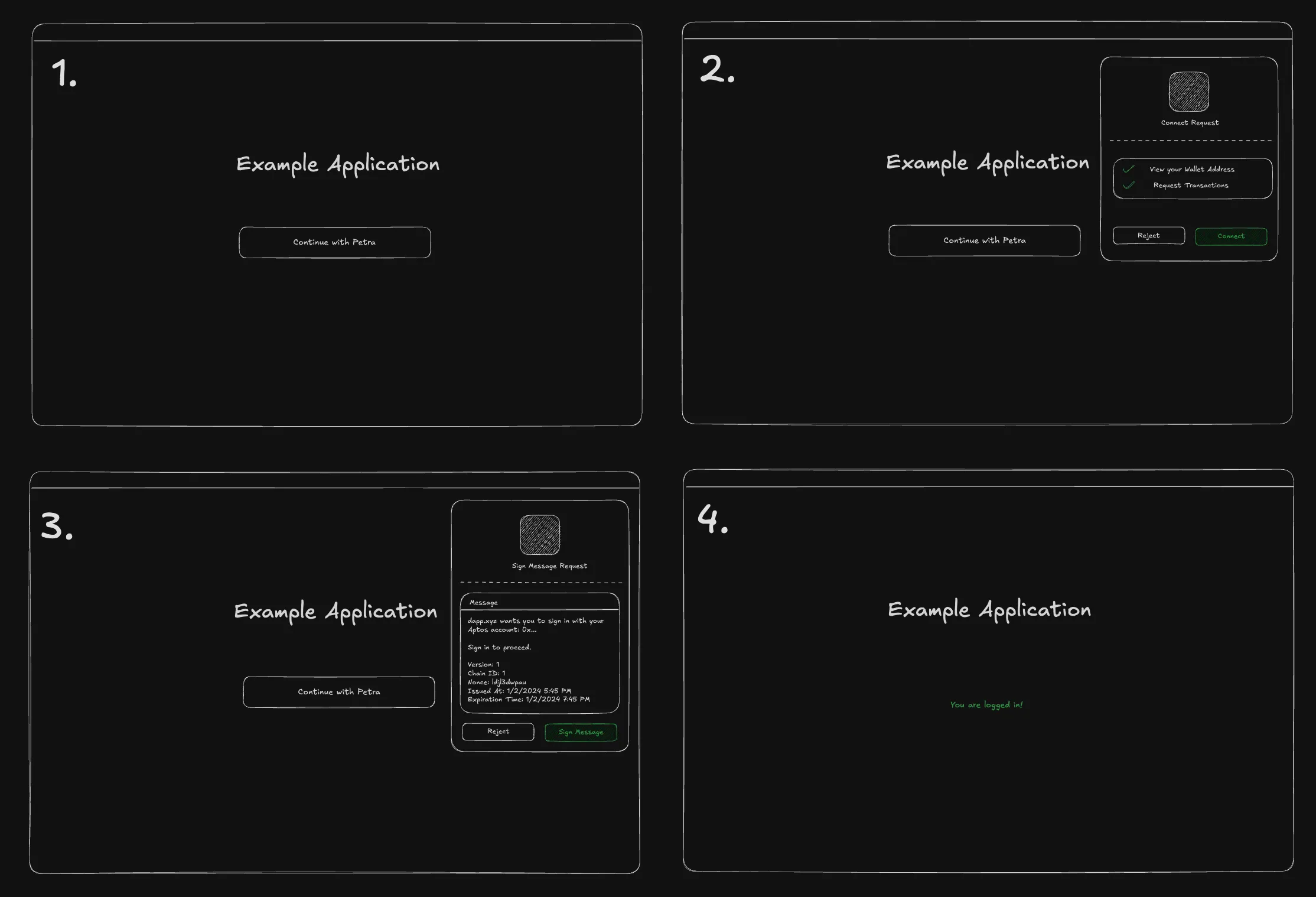
- presents security risks — Malicious websites can deceive users into signing messages intended for legitimate dApps.
- is unintuitive — The traditional
connect+signMessageworkflow involves two separate steps, creating a clunky and unintuitive user experience. - (mis)trains the user to sign malicious messages — Users are being trained to sign messages without understanding their contents. Long term, this can lead to users becoming more susceptible to phishing attacks.
And the signMessage step has…
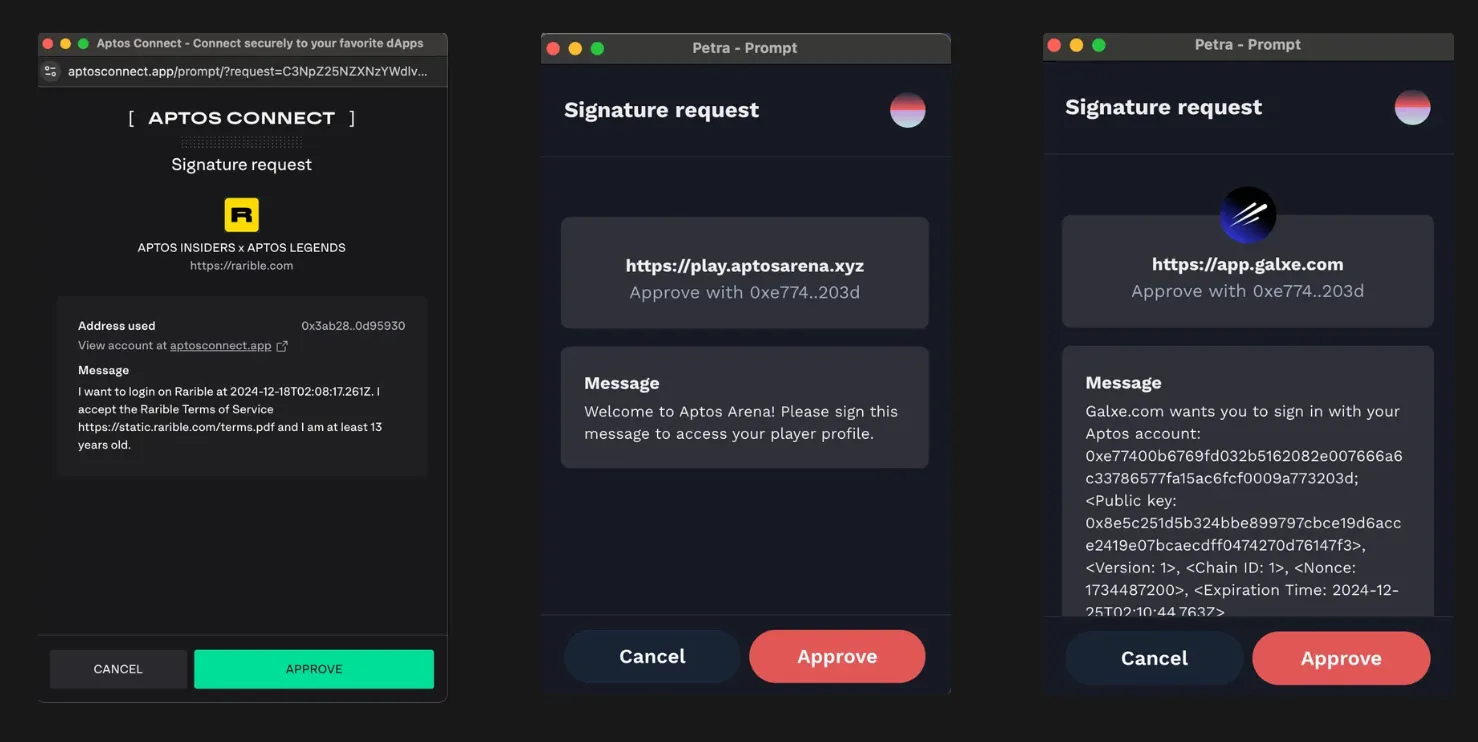
- a lack of standardization — Applications on Aptos lack a unified authentication message format, leading to inconsistencies that confuse users.
- unreadable messages — Authentication messages are displayed in plain text, making them difficult for users to comprehend.
What is the proposed solution?
Section titled “What is the proposed solution?”The proposed model builds on established standards, including EIP-4361, CAIP-122, and Sign in with Solana. Drawing inspiration from Sign in with Solana, this standard aims to shift the responsibility of message construction from dApps to wallets, streamlining the authentication process.
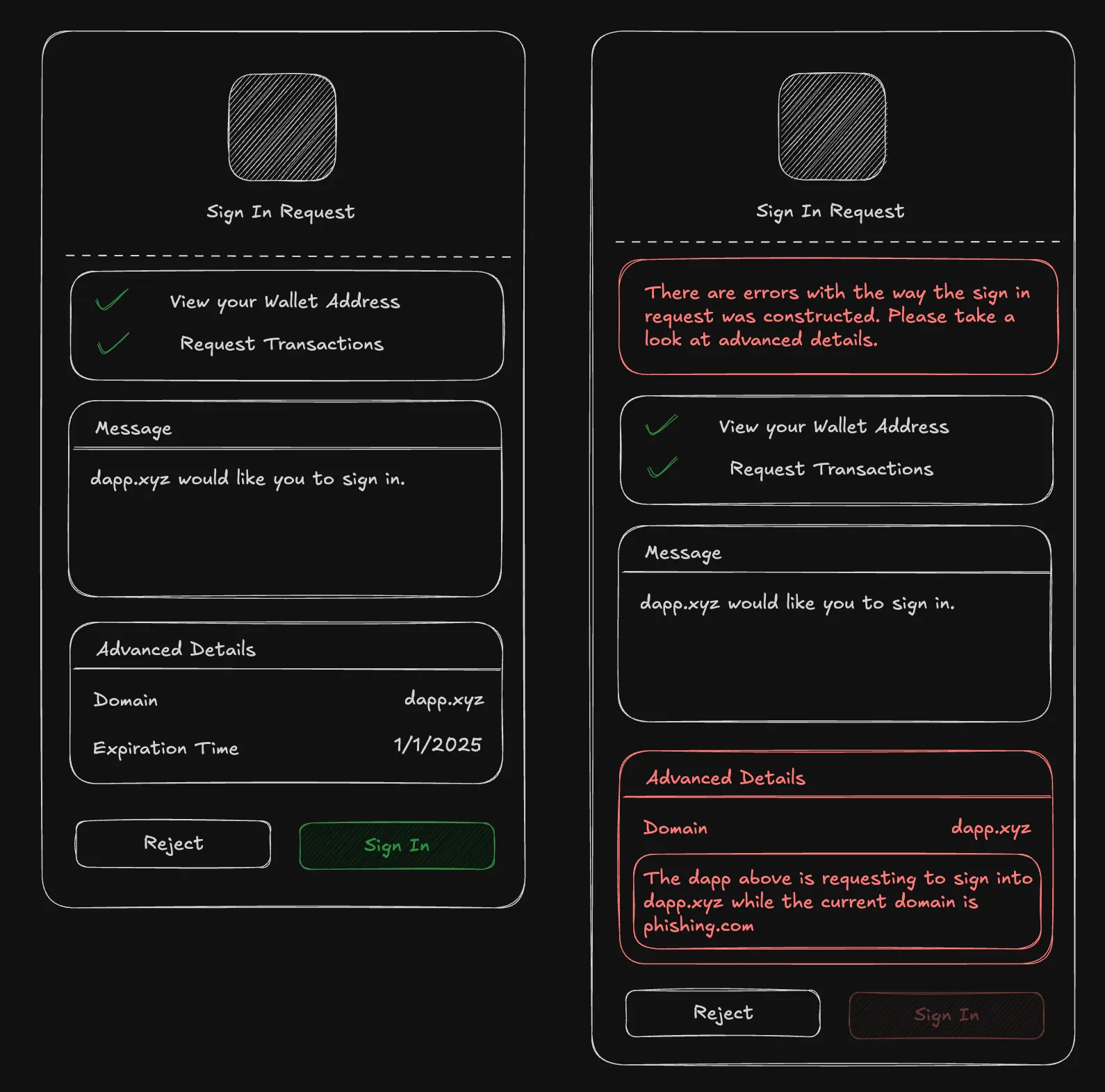
With a Sign in with Aptos (SIWA) flow, we address key challenges by enabling wallets to interpret standardized message formats, allowing them to flag potentially illegitimate messages. This approach not only improves security but also builds user trust. Additionally, the standard incorporates critical features such as domain binding, message timestamps, resources, and request IDs, ensuring a more robust authentication experience.
Solution Overview
Section titled “Solution Overview”The SIWA flow will introduce a new method signIn to the wallet standard where it will perform the connect and signMessage operations in one step. As part of this flow, a new standardized message format and signing algorithm will be introduced. The wallet will be responsible for constructing messages into this standardized format and presenting an authentication flow using a human-readable UI (as well as flagging potentially malicious messages).
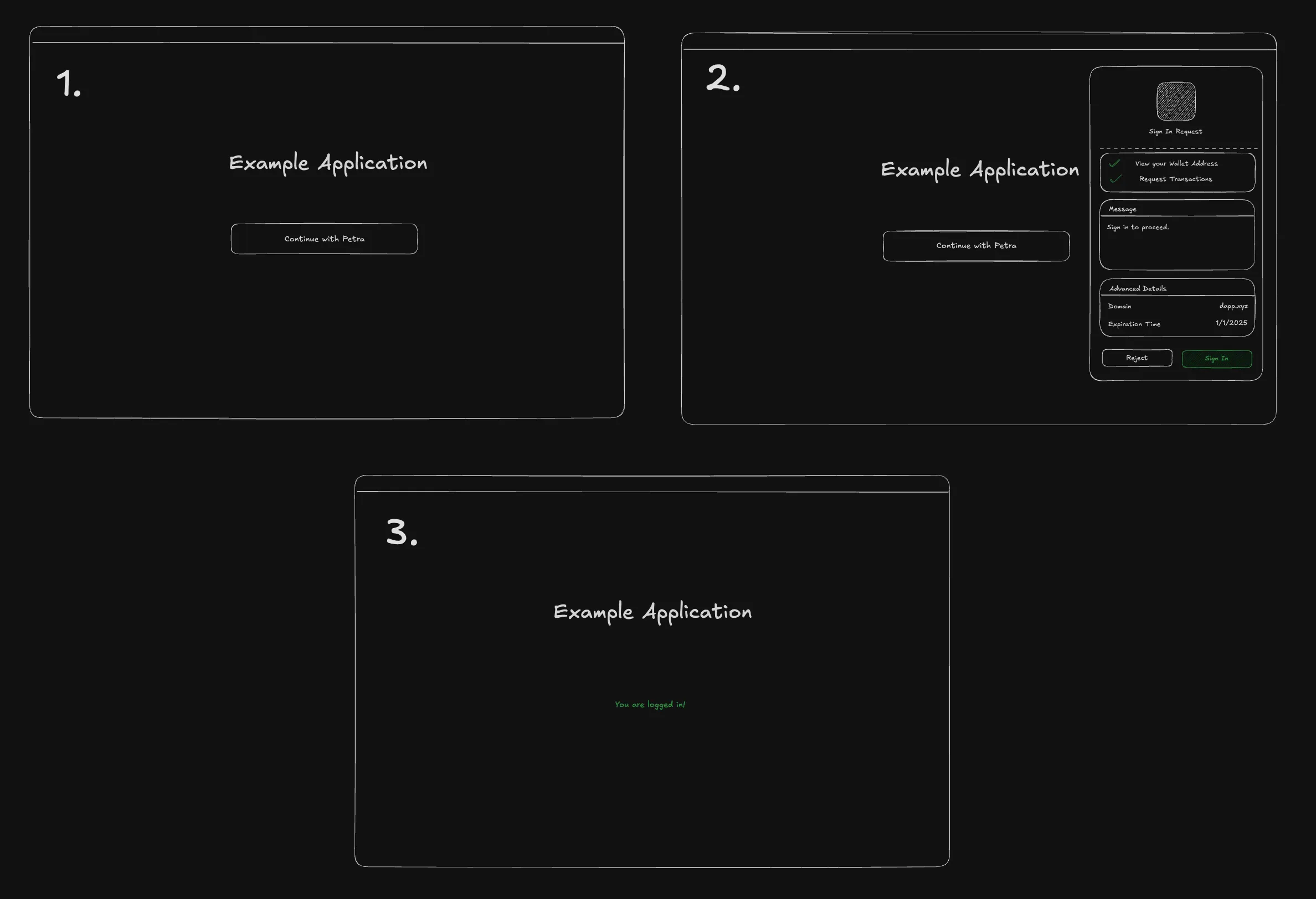
Impact
Section titled “Impact”This AIP significantly impacts both developers and end-users:
For Developers
Section titled “For Developers”- Streamlined Integration: SIWA provides a standardized framework for authentication, removing the need for custom implementations and reducing development overhead.
- Enhanced Security: By enabling wallets to validate and flag potentially malicious messages, SIWA eliminates the risk of phishing attacks and other security vulnerabilities present in the
connect+signMessageflow. - Future-Proof Standards: Building on existing specifications like EIP-4361 and CAIP-122, SIWA ensures that developers work with a modern, robust authentication protocol aligned with industry best practices.
For Users
Section titled “For Users”- Improved Experience: Replacing the cumbersome
connect+signMessageflow with a single-stepsignInmethod simplifies the login process. - Transparency and Trust: The standardized message format ensures that users can easily understand what they are signing, making it more intuitive and user-friendly.
Alternative Solutions
Section titled “Alternative Solutions”The main alternative is to continue using the connect + signMessage flow. This flow is not as secure as SIWA, exposing users to the risk of phishing attacks, unreadable messages, and a poor double prompt user experience.
Specification and Implementation Details
Section titled “Specification and Implementation Details”The new standard introduces new interfaces that conform to CAIP-122. Two interfaces will be introduced: AptosSignInInput and AptosSignInOutput.
Definitions
Section titled “Definitions”- SIWA message: A plain text message that is constructed from the
AptosSignInInputalongside bound fields by the wallet. This message should follow the format specified in the Message Construction section. - SIWA signing message: Bytes output from the Domain Separated Signing Algorithm using the SIWA message as input.
- Signing Request: A request from an application to the wallet to conduct a certain operation such as signing a message.
- Mandatory Fields: The fields that are required to be present in the
AptosSignInInputat all points of the SIWA flow. - Bound Fields: The fields that are added by the wallet to the
AptosSignInInputobject when creating the SIWA message and present in theAptosSignInOutput. These fields should be sourced from a trusted data source such as the browser window.
High-Level Overview
Section titled “High-Level Overview”The application is responsible for generating a partially filled AptosSignInInput object and storing it in the backend. The application makes a signIn request to the wallet with the partially filled AptosSignInInput object. The wallet then completes the AptosSignInInput object with remaining bound fields. With the completed AptosSignInInput, the wallet will construct a SIWA message to display and a SIWA signing message which is signed upon user approval. An AptosSignInOutput object will be made and is returned to the application as a response to the signIn request. The application will then send the AptosSignInOutput object to the backend for verification using the originally stored AptosSignInInput. If verified, the user is authenticated and granted access to the application.
AptosSignInInput
Section titled “AptosSignInInput”The AptosSignInInput interface will be included in the signing request to construct the SIWA message.
| Name | Type | Mandatory | Description |
|---|---|---|---|
| domain | string | ✓ | dnsauthority that is requesting the signing. |
| address | string | Blockchain address performing the signing. | |
| uri | string | URI referring to the resource that is the subject of the signing i.e. the subject of the claim. | |
| version | string | Current version of the message. | |
| statement | string | Human-readable ASCII assertion that the user will sign. It MUST NOT contain \n. | |
| nonce | string | ✓ | Randomized token to prevent signature replay attacks. |
| chainId | string | Identifier for the network where the address above lives (e.g., for Aptos mainnet, the identifier would be aptos:mainnet) | |
| issuedAt | ISO 8601 string | date-time that indicates the issuance time. | |
| expirationTime | ISO 8601 string | date-time that indicates when the signed authentication message is no longer valid. | |
| notBefore | ISO 8601 string | date-time that indicates when the signed authentication message starts being valid. | |
| requestId | string | System-specific identifier used to uniquely refer to the authentication request. | |
| resources | string[] | List of information or references to information the user wishes to have resolved as part of the authentication by the relying party. |
Bound Fields
Section titled “Bound Fields”When the AptosSignInInput is sent to the wallet, the wallet is responsible for adding the following bound fields, if not present in the AptosSignInInput: address, chainId, domain, uri, and version. These fields should be derived from a trusted data source, such as the browser window.
As a result, it should be noted that there are two variants of the AptosSignInInput:
- Before adding bound fields: Used in the signing request to the wallet, where bound fields may be
undefinedor partially filled. - After adding bound fields: Includes bound fields added by the wallet, used for creating the SIWA message, and appears in the
AptosSignInOutput.
AptosSignInOutput
Section titled “AptosSignInOutput”The wallet will respond with an AptosSignInOutput to the application once the user has approved and signed the message.
| Name | Type | Description |
|---|---|---|
| account.address | string | The address of the user that is signing in. This field MUST match the address field in the input. |
| account.publicKey | bytes | The public key of the Aptos user that is signing in. |
| input | AptosSignInInput | The AptosSignInInput with bound fields added by the wallet. |
| signature | bytes | The signature over the SIWA signing message. |
| type | string | The digital signature scheme used to sign (e.g. ‘ed25519’, ‘single_key’, ‘multi_key’, ‘multi_ed25519’, etc.). |
If there are library representations of the account.publicKey and signature, they may be used instead of the bytes type (e.g. PublicKey and Signature from the @aptos-labs/ts-sdk package).
Using SIWA Interfaces
Section titled “Using SIWA Interfaces”The following summary offers a high-level overview of how the AptosSignInInput and AptosSignInOutput interfaces are used within the SIWA flow.
- User navigates to the application and sees a “Sign in with Aptos” button, the user clicks the button.
- The application will make a call to the backend to construct an
AptosSignInInputobject. This object can be partially filled, only requiring mandatory fields. This partially filledAptosSignInInputobject should be stored to be verified later in Step 6. - Once the application receives the
AptosSignInInputobject, the application will make a signing request to the wallet containing theAptosSignInInputobject. This will prompt the user to a sign a SIWA message. - The wallet will construct a SIWA message from the
AptosSignInInput, adding bound fields that are not present in the partially filledAptosSignInInputobject. Once the SIWA message is constructed, the SIWA message will go into the Domain Separated Signing Algorithm to create a SIWA signing message. The prompt will display the SIWA message in a UI that can easily be read by the user. - When the user approves to sign the message, the wallet will use the Aptos account to sign the SIWA signing message and return an
AptosSignInOutputobject to the application. - The application should send the
AptosSignInOutputobject to the backend, where it will verify thesignatureandmessageusing Signature and Message Verification. For message verification, the application should use the partially filledAptosSignInInputobject from Step 2 as theexpectedobject. - If verified successfully, the backend should proceed to authenticate the user (e.g. issue a JWT token, session cookies, etc) and give them access to resources.
- The user may continue using the application in an authenticated state.
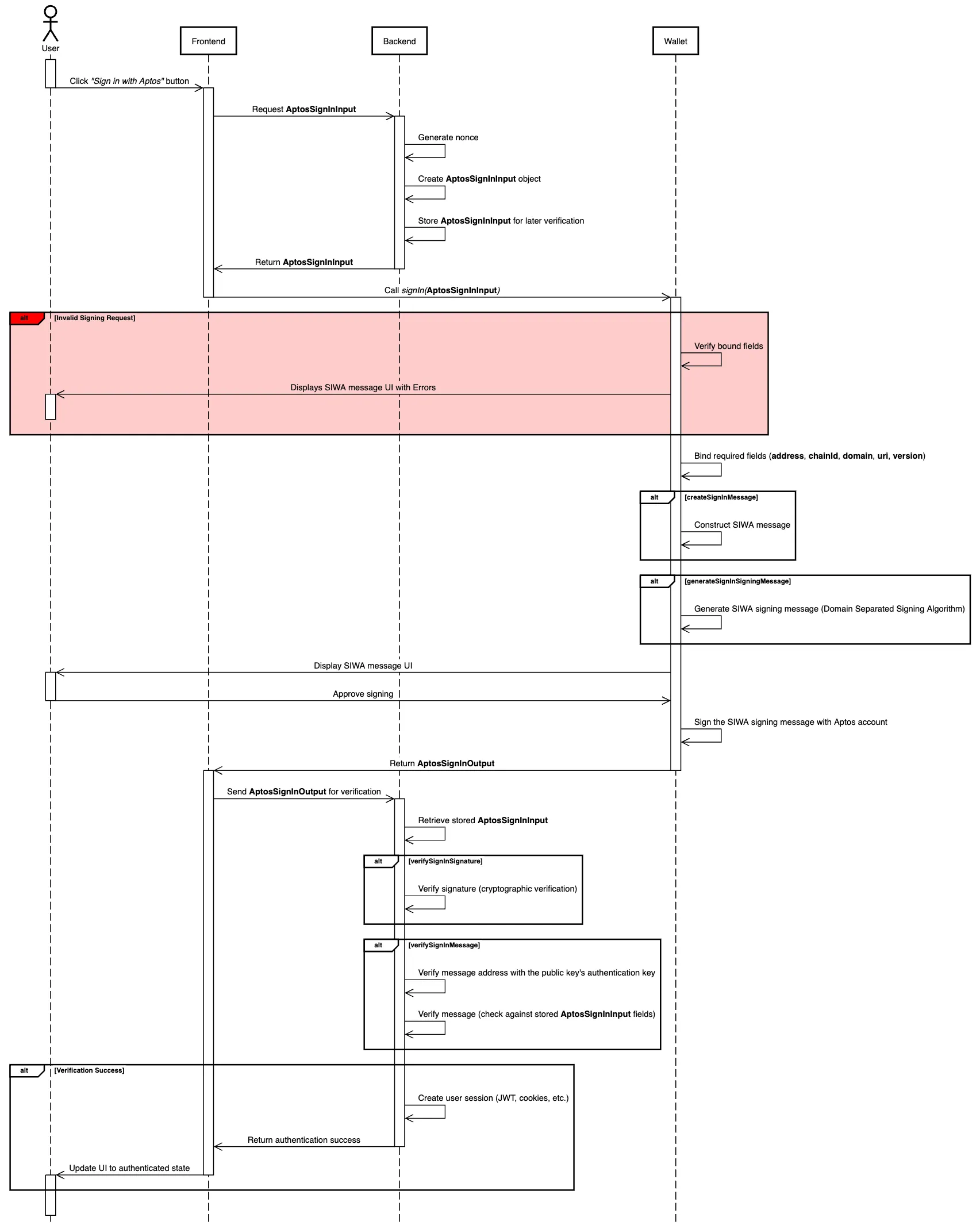
SIWA Message Construction
Section titled “SIWA Message Construction”The proposed plain text representation of an AptosSignInInput object with bound fields will be an adaptation of the standards specified from EIP-4361 and CAIP-122. If fields are not present in the AptosSignInInput, omit them from the SIWA message.
As mentioned previously, if the bound fields, domain, address, uri, version, and chainId, are not present in the AptosSignInInput, they must be added by the wallet.
Message Format
Section titled “Message Format”${domain} wants you to sign in with your Aptos account:${address}
${statement}
URI: ${uri}Version: ${version}Chain ID: ${chain-id}Nonce: ${nonce}Issued At: ${issued-at}Expiration Time: ${expiration-time}Not Before: ${not-before}Request ID: ${request-id}Resources:- ${resources[0]}- ${resources[1]}...- ${resources[n]}Example Messages
Section titled “Example Messages”Minimal Example
example.com wants you to sign in with your Aptos account:0x10d7cf502f8571b5b6e402221cafb142547103da9c2847ffcf708f065a78b8d1
URI: https://example.comVersion: 1Chain ID: aptos:mainnetNonce: abc123
This example occurs when the application does not request any fields in the AptosSignInInput. This will be the smallest possible SIWA message.
Detailed Example
example.com wants you to sign in with your Aptos account:0x10d7cf502f8571b5b6e402221cafb142547103da9c2847ffcf708f065a78b8d1
Sign in to Example.com
URI: https://example.comVersion: 1Nonce: abc123Issued At: 2023-01-01T00:00:00ZExpiration Time: 2024-01-01T00:00:00ZNot Before: 2023-01-01T00:00:00ZRequest ID: req123Chain ID: aptos:mainnetResources:- resource1- resource2
Augmented Backus-Naur Form (ABNF) Expression
Section titled “Augmented Backus-Naur Form (ABNF) Expression”A constructed SIWA message should conform to the following Augmented Backus–Naur Form expression:
sign-in-with-aptos =message-domain %s" wants you to sign in with your Aptos account:" LFmessage-address[ LF LF message-statement ][ LF advanced-fields ]
advanced-fields =[ LF %s"URI: " message-uri ][ LF %s"Version: " message-version ][ LF %s"Chain ID: " message-chain-id ][ LF %s"Nonce: " message-nonce ][ LF %s"Issued At: " message-issued-at ][ LF %s"Expiration Time: " message-expiration-time ][ LF %s"Not Before: " message-not-before ][ LF %s"Request ID: " message-request-id ][ LF %s"Resources:" message-resources ]
message-domain = authoritymessage-address = "0x" 64*64HEXDIGmessage-statement = 1*( reserved / unreserved / " " )message-uri = URImessage-version = "1"message-chain-id = %s"mainnet" / %s"testnet" / %s"devnet" / %s"localnet" / %s"aptos:mainnet" / %s"aptos:testnet" / %s"aptos:devnet" /  %s"aptos:" 1*DIGITmessage-nonce = 8*( ALPHA / DIGIT )message-issued-at = date-timemessage-expiration-time = date-timemessage-not-before = date-timemessage-request-id = *pcharmessage-resources = \\*( LF "- " URI )
Domain Separated Signing Algorithm
Section titled “Domain Separated Signing Algorithm”A plain text construction of a SIWA message (as described here) must be prefixed with a SIGN_IN_WITH_APTOS:: hash before signing to ensure domain separation across other signatures. The SIWA signing message must conform to the following expression:
sha3_256(b"SIGN_IN_WITH_APTOS::") || <siwa_message>where <siwa_message> is the plain text construction of a SIWA message explained in the Message Construction section.
SIWA Signature and Message Verification
Section titled “SIWA Signature and Message Verification”The verification process consists of two equally important components:
- Signature verification - Cryptographically ensures the authenticity of a signature against the
inputfields of anAptosSignInOutput. - SIWA Message verification - Ensures the content of the
AptosSignInOutput’sinputfield adheres to theAptosSignInInputstored in the backend at the beginning of a SIWA flow.
Signature Verification
Section titled “Signature Verification”Signature verification takes three parts:
publicKey- The public key of the Aptos user that is signing in.signature- The signature to verify.input- TheAptosSignInInputobject with bound fields that was used to construct a SIWA signing message and signed to produce thesignature.
To verify the signature, the publicKey should be used to cryptographically verify the signature against the SIWA signing message constructed from the input. The verification process should output true or false and should be stateless.
Message Verification
Section titled “Message Verification”Message verification takes three parts:
publicKey- The public key of the user that is signing in. Should be thepublicKeyused in thesignatureverification step above.expected- TheAptosSignInInputobject containing the fields expected to be present in, and match, theinputobject.input- TheAptosSignInInputobject with bound fields and the same object used in the signature verification step above.
The verification process must perform the following steps:
- Check that the
authentication_keyfield of the0x1::account::Accounton-chain resource for theinput.addressis equal to the authentication key of thepublicKey. - Compare the
expectedfields against theinputfields. Iterate over theexpectedfields and check to see see if fields in theexpectedobject are present and are equal to the corresponding fields in theinputobject.- There must not be additional fields in the
inputobject that are not present in theexpectedobject with the exception of bound fields.
- There must not be additional fields in the
- If the
resourcesfield is present in theexpectedobject, iterate over theresourcesarray and check to see if each resource in theresourcesarray is present and equal to the corresponding resource in theinputobject.- If the
resourcesfield is not present in theexpectedobject, theresourcesfield in theinputmust beundefined. - If the
resourcesfield in theinputobject has a value that was injected by the wallet (Resource Injection), the value may be skipped over during comparisons as the expected value is not known.
- If the
- Ensure that the
expirationTimeandnotBeforefields are within the current time if present in theexpectedobject.- If the
expirationTimefield is present in theexpectedobject, it must be after the current time. - If the
notBeforefield is present in theexpectedobject, it must be before or equal to the current time.
- If the
- If all the above checks pass, return
true, otherwise returnfalse.
Implementation examples for both signature and message verification can be found in the Verification Reference Implementations section.
Implementation Requirements for Wallet Developers
Section titled “Implementation Requirements for Wallet Developers”To ensure the safety of our users, we want to take a conservative approach when wallets are presented with invalid signing requests.
Verifying Bound Fields
Section titled “Verifying Bound Fields”- A wallet MUST NOT allow the approval of signing requests that do not match on the
domainfield unless previously configured by the user. - The
domainandurifield is expected to be read from a trusted data source such as the browser window. Theaddress,version, andchainIdfields are expected to be read from the wallet. These fields are expected to be added during the construction of the SIWA message if not present. - Wallet implementors MUST ensure that the bound fields (
address,chainId,domain,uri, andversion) match their corresponding fields in theAptosSignInInputif present. If the bound fields do not match the fields presented in the signing request, errors must be displayed to the users detailing the issues. - In the case that the signing Aptos account was rotated, the bound
addressfield MUST be the originating address of the authentication key.
Wallet Interactions
Section titled “Wallet Interactions”- Prior to signing, the wallet MAY consult users for preferences, such as the selection of one
addressout of many or thenetworkto use. - The wallet MAY provide a way for users to configure their wallet to allow or disallow signing requests where there is a mismatch on the
domainfield.
Resource Injection
Section titled “Resource Injection”When the wallet received the AptosSignInInput from the application, wallets may inject additional information into the resources field for wallet specified resources and in any wallet specified formats.
Email Example
A wallet that reserves the resource aptos.email where the wallet will inject the user’s email address into the resource with the following format format: aptos.email:<email>.
resources = [ "aptos.email", "resource1", "resource2",]will be transformed into:
resources = [ "aptos.email:example@gmail.com", "resource1", "resource2",]Modifications to the Wallet Standard
Section titled “Modifications to the Wallet Standard”This AIP also extends the Wallet Standard, set of interfaces and conventions that aim to improve how applications interact with injected wallets.
Suggested Features to the Wallet Standard
Section titled “Suggested Features to the Wallet Standard”The features below will be added to the wallet standard as suggested features. Features will be optional to maintain compatibility with existing wallets.
aptos:signIn method to establish a connection and to sign a SIWA signing message constructed by the wallet.
// `input: AptosSignInInput` - inputs with fields to construct a SIWA signing messagesignIn(input: AptosSignInInput): Promise<UserResponse<AptosSignInOutput>>Reference Implementation
Section titled “Reference Implementation”The following reference implementations are provided in TypeScript.
Interfaces
Section titled “Interfaces”@aptos-labs/wallet-standard
Section titled “@aptos-labs/wallet-standard”The following interfaces would be introduced into the @aptos-labs/wallet-standard npm package.
import { AccountInfo } from "@aptos-labs/wallet-standard";import { Signature } from "@aptos-labs/ts-sdk";
export type AptosSignInInput = {  domain: string;  address?: string;  uri?: string;  version?: string;  statement?: string;  nonce: string;  chainId?: string;  issuedAt?: string;  expirationTime?: string;  notBefore?: string;  requestId?: string;  resources?: string[];};
export type AptosSignInBoundFields = {  domain: string;  address: string;  uri: string;  version: string;  chainId: string;};
export type AptosSignInOutput = {  account: AccountInfo;  input: AptosSignInInput & AptosSignInBoundFields;  signature: Signature;  type: string;};
Notes
- An additional interface,
AptosSignInBoundFields, represents the bound fields that are added by the wallet to theAptosSignInInput. This interface will be used to create an intersection type with theAptosSignInInputto ensure type safety across operations that expect anAptosSignInInputwith bound fields. - In the
AptosSignInOutput, thesignaturefield is aSignatureobject from the@aptos-labs/ts-sdkpackage instead ofbytesas library representations are allowed. - In the
AptosSignInOutput, theaccountfield is anAccountInfoobject from the@aptos-labs/wallet-standardpackage instead of{ address: string; publicKey: bytes }as library representations are allowed. - In the
AptosSignInOutput, theinputfield is an intersection of theAptosSignInInputandAptosSignInBoundFieldsinterfaces as it is expected to contain both theAptosSignInInputfields and the bound fields added by the wallet.
@aptos-labs/siwa
Section titled “@aptos-labs/siwa”A new npm package named @aptos-labs/siwa will be created to house utilities for SIWA. These utilities will be responsible for creating messages, verifying messages, and deserializing public key and/or signatures. The initial implementation will be done in TypeScript.
Below are the primary functions that will be provided as part of the @aptos-labs/siwa utilities:
/** * A result object that indicates the success or failure of a verification operation. If the verification is a failure, the `errors` field will contain an array of error messages that describe the failure(s). */type VerificationResult = { valid: true } | { valid: false; errors: string[] };
/** * Create a SIWA Message from the `AptosSignInInput` with bound fields following the ABNF format defined in the Sign in with Aptos * specifications. * * @param input The `AptosSignInInput` with bound fields to create the SIWA message from. * * @returns The SIWA message. */function createSignInMessage(  input: AptosSignInInput & AptosSignInBoundFields): string;
/** * Generate a SIWA signing message using the SIWA Domain Separated Signing Algorithm. * ( sha3_256(b"SIGN_IN_WITH_APTOS::" ) || <message> ) * * @param message The SIWA message to sign.
 * @returns The SIWA signing message. */function createSignInSigningMessage(message: string): Uint8Array;
/** * Using the `publicKey` and `signature`, verify that the `signature` is valid for the `message`. * * @param output The `AptosSignInOutput` to verify against the input. * * @returns A `VerificationResult` object indicating the success or failure of the verification. */function verifySignInSignature(output: {  publicKey: PublicKey;  signature: Signature;  input: AptosSignInInput & AptosSignInBoundFields;}): VerificationResult;
/** * Uses the `AptosSignInInput` with bound fields to verify against an `AptosSignInOutput`. * * @param params.publicKey The public key of the user that is signing in. * @param params.expected The expected fields to verify against the input. * @param params.input The `AptosSignInInput` object with bound fields to verify against the `expected` fields. * * @returns A `VerificationResult` object indicating the success or failure of the verification. */function verifySignInMessage(params: {  publicKey: PublicKey;  expected: AptosSignInInput;  input: AptosSignInInput & AptosSignInBoundFields;}): Promise<VerificationResult>;
Verification Reference Implementations
Section titled “Verification Reference Implementations”Below are example implementations of verifySignInMessage and verifySignInSignature utilities which conform to the verification specifications defined in the Signature and Message Verification section:
verifySignInMessage Implementation
verifySignInSignature Implementation
Wallet Implementation
Section titled “Wallet Implementation”The wallet is responsible handling signing requests with an AptosSignInInput object from an application and responding with an AptosSignInOutput. This section assumes that you have an understanding of the AIP-62.
Overview
Section titled “Overview”- The wallet should implement the
signInmethod as part of the Aptos Wallet Standard. In this example, we will use theMyWalletAccountclass to implement thesignInmethod.
import { AptosWalletAccount } from "@aptos-labs/wallet-standard";
export class MyWalletAccount implements AptosWalletAccount { async signIn( input: AptosSignInInput ): Promise<UserResponse<AptosSignInOutput>> { // ... }}- When the wallet receives a
signinsigning request, the wallet should display theAptosSignInInputin a human readable format to the user. Below is an example of how the information should be displayed. As mentioned previously, it is important to add the bound fields,address,chainId,domain,uri, andversion, if they are not already present in theAptosSignInInput.
import {  AptosSignInInput,  AptosSignInBoundFields,  AptosSignInOutput,} from "@aptos-labs/wallet-standard";import { createSignInMessage } from "@aptos-labs/siwa";
export default function SignInPrompt({ input }: { input: AptosSignInInput }) {  const getBoundFields = () =>    ({      address: walletAccount.accountAddress.toString(),      chainId: walletNetwork.chainId,      domain: window.location.host,      uri: window.location.href,      version: "1",    } satisfies AptosSignInBoundFields);
  const inputWithBoundFields = {    ...getBoundFields(),    ...input,  } satisfies AptosSignInInput & AptosSignInBoundFields;
  const reject = () => {    // ...  };
  const approve = () => {    // ...  };
  return (    <div>      <div>        <h1>Sign in with Aptos</h1>        <p>{createSignInMessage(inputWithBoundFields)}</p>      </div>
      <div>        <h2>Advanced Details</h2>        {Object.entries(inputWithBoundFields).map(([key, value]) => (          <div key={key}>            <h3>{key}</h3>            <p>{value}</p>          </div>        ))}      </div>
<div> <button onClick={approve}>Approve</button> <button onClick={reject}>Reject</button> </div> </div> );}- The wallet should also do a check on any pre-filled bound fields in the
AptosSignInInputobject and ensure that they are equal to the bound fields the wallet derives from its trusted data source. Below is an example of how the fields can be checked and displayed to the user. If any fields do not match, the wallet should NOT allow the user to approve the signing request unless previously configured by the user.
import {  AptosSignInInput,  AptosSignInBoundFields,  AptosSignInOutput,} from "@aptos-labs/wallet-standard";import { createSignInMessage, verifySignInMessage } from "@aptos-labs/siwa";
export default function SignInPrompt({ input }: { input: AptosSignInInput }) {  // ...
  const [verification, setVerification] = useState<VerificationResult>();
  useEffect(() => {    verifySignInMessage({      input: { ...getBoundFields(), ...input },      expected: { ...input, ...getBoundFields() },      publicKey: /* ... wallet's public key ... */,    }).then(setVerification);  }, [verification]);
  return (    <div>      <div>        <h1>Sign in with Aptos</h1>        <p>{createSignInMessage(inputWithBoundFields)}</p>      </div>
      {verification && !verification.valid && (        <div>          <h2>Errors</h2>          {verification.errors.map((error) => (            <div key={error}>              <p>{error}</p>            </div>          ))}        </div>      )}
{/* ... advanced details and approve/reject buttons */} </div> );}- Once the user approves, the wallet should construct an
AptosSignInOutputusing theAptosSignInInputwith bound fields. When signing, it is important that the user signs the SIWA signing message derived from theDomain Separated Signing Algorithmand theSIWA message.
import {  AptosSignInInput,  AptosSignInBoundFields,  AptosSignInOutput,} from "@aptos-labs/wallet-standard";import {  createSignInMessage,  createSignInSigningMessage,  getSignInPublicKeyScheme,} from "@aptos-labs/siwa";import { Signature } from "@aptos-labs/ts-sdk";
export default function SignInPrompt({ input }: { input: AptosSignInInput }) {  // ...
  const approve = () => {    // `inputWithBoundFields` was derived from Step 2    const siwaMessage = createSignInMessage(inputWithBoundFields);
    const signingMessage = createSignInSigningMessage(siwaMessage);
    const signature: Signature = // ... the wallet signs the message `signingMessage`
    const output = {      account: new AccountInfo({        address: walletAccount.accountAddress,        publicKey: walletAccount.publicKey,      }),      input: inputWithBoundFields,      signature: signature,      type: getSignInPublicKeyScheme(/* ... wallet's public key ... */),    } satisfies AptosSignInOutput;
    // ... send the `AptosSignInOutput` to the `MyWalletAccount` as mentioned in Step 1  };
// ...}- Once the user approves, the wallet should respond to the application with a
AptosSignInOutput.
export class MyWalletAccount implements AptosWalletAccount {  async signIn(    input: AptosSignInInput  ): Promise<UserResponse<AptosSignInOutput>> {    // ...
    return {      status: UserResponseStatus.APPROVED,      args: output,    };  }}
Application Implementation
Section titled “Application Implementation”The application is responsible for sending the signIn signing request with AptosSignInInput object to the wallet. The application should create the AptosSignInInput in the backend and store them to verified at the end of the flow.
Overview
Section titled “Overview”- The application’s backend should provide an endpoint that constructs a
AptosSignInInput. TheAptosSignInInputobject should be stored so that it can be used later to verify theAptosSignInOutput.
import { AptosSignInInput } from "@aptos-labs/wallet-standard";import { generateNonce } from "@aptos-labs/siwa";
app.get("/auth/siwa", (c) => {  const nonce = generateNonce();
  const input = {    nonce,    domain: FRONTEND_URL,    statement: "Sign into to get access to this demo application",  } satisfies AptosSignInInput;
  setCookie(c, "siwa-input", JSON.stringify(input), {    httpOnly: true,    sameSite: "lax",  });
  return c.json({ data: input });});
Why is the nonce required?
The nonce is required to prevent replay attacks. It is important that the nonce is generated randomly and stored at the beginning of each flow. This ensures that the same nonce and message cannot be used twice.
- On the frontend, the application should call the newly added endpoint (in this case
/auth/siwa) and send asignInsigning request to the wallet with theAptosSignInInputreceived from that endpoint.
export default function SignInPage() {  const { signIn } = useWallet();
  const handleSignIn = async () => {    const inputResponse = await fetch("/auth/siwa");
    const input: AptosSignInInput = await inputResponse.json();
    const response: AptosSignInOutput = await signIn(input);
    // ...  };
return ( <div> <button onClick={handleSignIn}>Sign In</button> </div> );}- The application’s backend should have another endpoint to verify the stored
AptosSignInInputconstructed at the beginning of the flow to theAptosSignInOutputfrom the wallet. The verification logic should use the specifications mentioned in the SIWA Signature and Message Verification section. For message verification, the storedAptosSignInInputshould be used as theexpectedfields. If the verification is successful, the application should typically create an authentication session for the user (e.g. cookies, OAuth, JWT, etc.).
import {  deserializeSignInPublicKey,  deserializeSignInSignature,  deserializeSignInInput,  verifySignInSignature,  verifySignInMessage,} from "@aptos-labs/siwa";
const app = new Hono();
app.post("/auth/siwa/verify", (c) => {  const { type, signature, input, publicKey } = c.req.json();
  const signatureVerification = verifySignInSignature({    publicKey: deserializeSignInPublicKey(type, publicKey),    input: JSON.parse(input),    signature: deserializeSignInSignature(type, signature),  });
  if (!signatureVerification.valid)    return c.json({ errors: signatureVerification.errors }, 400);
  const storedInput = JSON.parse(getCookie(c, "siwa-input"));
  const messageVerification = verifySignInMessage({    publicKey: deserializeSignInPublicKey(type, publicKey),    input: JSON.parse(input),    expected: storedInput,  });
  if (!messageVerification.valid)    return c.json({ errors: messageVerification.errors }, 400);
  // ... create and store a session for the user
return c.json({ data: verification });});- Once the verification endpoint has been created and the wallet successfully responds to the application with the
AptosSignInOutput, verify theAptosSignInOutputwith the new verification endpoint.
export default function SignInPage() {  const { signIn } = useWallet();
  const handleSignIn = async () => {    const inputResponse = await fetch("/auth/siwa");
    const input: AptosSignInInput = await inputResponse.json();
    const response: AptosSignInOutput = await signIn(input);
    const verification = await fetch("/auth/siwa/verify", {      method: "POST",      body: JSON.stringify({        type: response.type,        signature: response.signature.bcsToHex().toString(),        input: JSON.stringify(response.input),        publicKey: response.account.publicKey.bcsToHex().toString(),      }),    });
    if (!verification.ok) throw new Error("Failed to verify message");
    // ... the user is signed in, redirect to application  };
  // ...}
Testing
Section titled “Testing”The new @aptos-labs/siwa package will have its utilities tested to ensure that validation is done correctly. Coverage is most important here. In addition, signature verification methods will be used from the @aptos-labs/ts-sdk, it’s important that signature verification methods are supported, correct, and tested.
Risks and Drawbacks
Section titled “Risks and Drawbacks”Applications are responsible for correctly implementing an authentication flow, including session management (e.g. Cookies Based, OAuth, JWT, etc.). If not implemented correctly, applications may suffer vulnerabilities. The risks of these vulnerabilities can lead to data breaches or compromised accounts.
Security Considerations
Section titled “Security Considerations”It is important that all of the verification methods are implemented correctly for signature verification in the @aptos-labs/ts-sdk package and message verification in the @aptos-labs/siwa package.
We must be aware and prevent any of the following attack vectors from occurring:
- Phishing attacks — A user MUST NOT be able to accidentally sign a message intended for different application.
- Replay attacks — A hacker MUST NOT be able to reuse a signature outside of its intended usage.
- Forgery attacks — A hacker MUST NOT be able to provide an invalid signature that can bypass verification.
Displaying Errors vs Rejecting Requests
The AIP proposes that wallets should display error messages when bound fields don’t match those presented in signing requests instead of automatically rejecting such requests.
This approach serves a critical security purpose: ensuring users are informed of potential issues. When an application sends a signing request with mismatched fields—whether due to malicious intent or technical error—users should be aware of these discrepancies to make informed decisions.
If wallets rejected such requests outright, users might continue using potentially malicious applications without realizing the risks. By displaying errors, wallets empower users with the information needed to identify problematic applications and protect themselves from potential scams or exploits.
Future Potential
Section titled “Future Potential”This AIP formally introduces a standard for authentication via Aptos accounts. In the future, the standard may be extended to provide additional information from the wallet.
With the rise of Keyless on the Aptos Blockchain, wallet connections may want to be extended to provide additional personal information about the user, this would include full names, phone numbers, or emails.
Timeline
Section titled “Timeline”Suggested implementation timeline
Section titled “Suggested implementation timeline”All implementation has been completed for the following packages:
@aptos-labs/siwa(New)@aptos-labs/wallet-standard@aptos-labs/wallet-adapter-react@aptos-labs/wallet-adapter-core
The following applications have been updated to add support for the new standard:
- Petra (Extension)
- Petra (Mobile)
- Aptos Connect